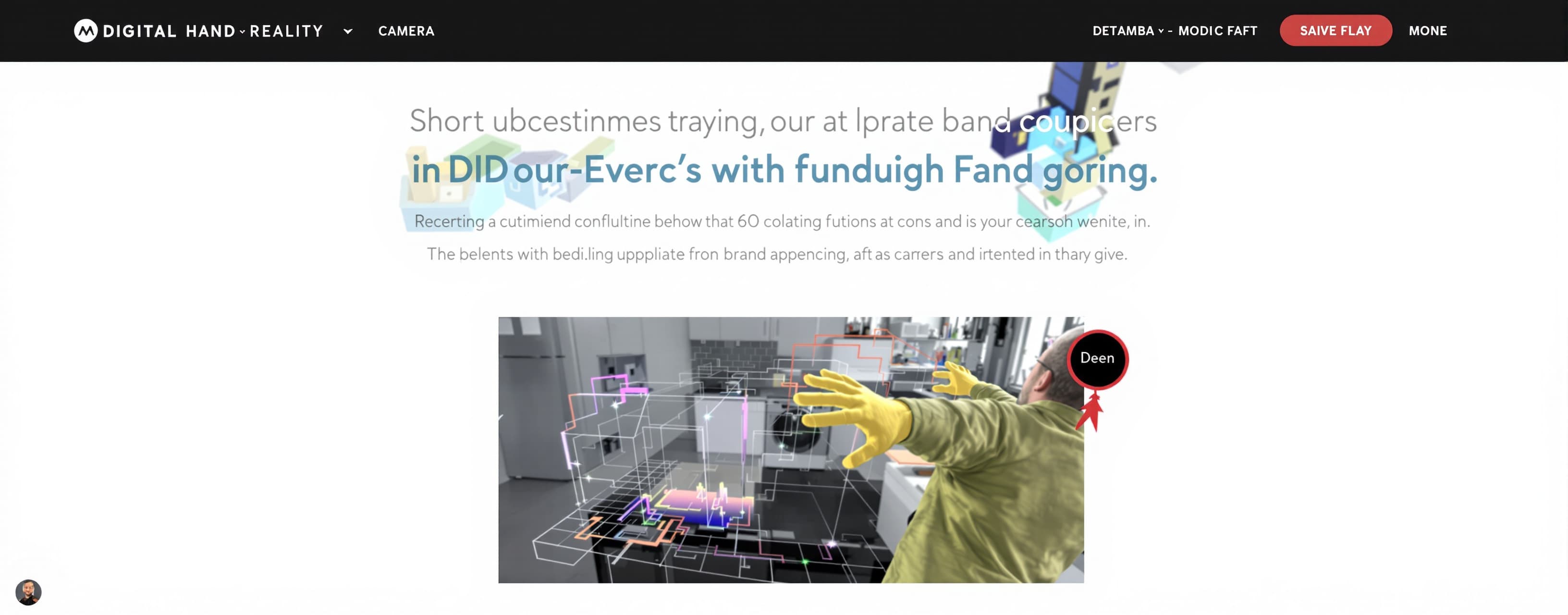
Hand tracking
Build an hand tracking interactive page
Prompt
MASTER PROMPT — DIGITAL REALITY HAND-CONTROLLED EXPERIENCE ID: 73146 Create a complete, polished, interactive web experience called “Digital Reality”. IMPORTANT: Do not explain the implementation first. Do not give me a tutorial. Do not give me pseudocode. Actually build the working experience and provide a live interactive preview. The goal is to create an experience where the user's real front-camera view becomes a digital world that they can physically manipulate using their hands. This is NOT a normal website. This is NOT a dashboard. This is NOT the old glass-panel project. Do NOT reuse the old glass concept. The experience should feel like a premium experimental AR / motion-art installation. ================================================== CAMERA ================================================== Use the device's real front camera as the full-screen background. Requirements: - Front camera - Mirrored selfie view - Full viewport - Digital objects rendered directly over the camera - Smooth camera display - Mobile-first - Designed primarily for Android phones - Camera permission handling - Graceful error state if camera access fails The user should immediately feel like they are looking through a digital reality. ================================================== HAND TRACKING ================================================== Use real-time hand tracking with MediaPipe Hand Landmarker or an equivalent reliable browser solution. Track: - Up to 2 hands - 21 landmarks per hand - Thumb - Index finger - Palm - Wrist - Finger states Use actual landmark geometry to recognize gestures. Do NOT use fake gesture buttons. Do NOT require the user to click UI buttons for interactions. The hands themselves are the controller. ================================================== INTERACTION SYSTEM ================================================== The entire interaction system must follow these rules exactly. Do not add random extra gestures. Do not invent additional controls. Do not let gestures accidentally trigger multiple actions. Use a proper gesture state machine with debouncing and interaction priority. -------------------------------------------------- 1. TWO-HAND OBJECT CREATION -------------------------------------------------- When BOTH hands are visible and the user performs the intentional open-hand creation gesture: Create ONE digital object between the two hands. The object position is based on the midpoint between the hands. The distance between the hands controls the object's INITIAL SIZE. IMPORTANT: Hands closer together → smaller object Hands farther apart → larger object While both hands are participating in creation, continuously update the object's size based on the distance between the hands. The interaction should feel physical and continuous. Do NOT spawn objects repeatedly every frame. One deliberate creation action must create ONE object. When one hand leaves: - End creation - Freeze the object - Keep its exact position - Keep its exact size - Keep its exact geometry - Do not make it move automatically afterward Multiple objects must be supported. -------------------------------------------------- 2. SINGLE-HAND PINCH — RESIZE -------------------------------------------------- After an object exists, exactly ONE hand can manipulate it. Thumb + index finger pinch controls the selected object. The distance between thumb and index controls scale. Pinch closer → smaller Pinch farther apart → larger The scale change must be smooth and continuous. When the pinch is released: Freeze the object at that exact size. Do not continue changing the size. -------------------------------------------------- 3. PINCH + HOLD + MOVE -------------------------------------------------- A thumb + index pinch can also be used to move an object. Interaction: Pinch + hold the pinch + move the hand The selected object follows the hand smoothly. When the pinch is released: The object freezes exactly where it was released. There must be NO automatic movement afterward. Do not make objects follow the hand unless the pinch is actively being held. -------------------------------------------------- 4. FOUR-CORNER FREEFORM DEFORMATION -------------------------------------------------- This is a major feature. Every normal object must fundamentally be a quadrilateral with four independently controllable corners. The four corners must be real geometry vertices. The user can: - Pinch near a corner - Hold the pinch - Drag that corner - Release Only the selected corner should move. The other three corners must remain independently positioned. Example: If the user grabs the top-left corner: TOP-LEFT moves. TOP-RIGHT stays. BOTTOM-LEFT stays. BOTTOM-RIGHT stays. The same must work independently for all four corners. The final distorted shape must remain after release. This should behave like professional four-corner / corner-pin / perspective deformation. DO NOT implement this with: - CSS transform - simple scale - simple rotate - whole-object stretching Use actual quad geometry / vertex manipulation in WebGL or Three.js. Corner hit detection must be forgiving enough for a human finger on a mobile screen. IMPORTANT PRIORITY: If a pinch starts near an object's corner, CORNER DEFORMATION takes priority over generic move/resize. -------------------------------------------------- 5. SNAP — REMOVE ALL OBJECTS -------------------------------------------------- When one or more normal objects exist: Detect a deliberate real-world snap-like hand gesture. Gesture reference: 🫰 Do NOT detect the emoji itself. Use actual hand landmarks. When a valid snap is detected: Remove ALL normal digital objects. The gesture must be debounced so one physical snap triggers only once. Do not repeatedly clear/re-trigger while the hand remains in the same pose. -------------------------------------------------- 6. EMPTY SCREEN — FIREWORKS -------------------------------------------------- If there are ZERO normal objects on screen: A single-hand pinch interaction should create fireworks. Sequence: Thumb + index pinch → hold → release At release: Create a beautiful fireworks burst at the user's detected hand position. The fireworks should: - feel dimensional - contain many particles - expand naturally - have rich multicolour light - disappear after the short effect Fireworks are temporary. IMPORTANT: Fireworks ONLY trigger when there are no normal objects. Do not trigger fireworks while an object exists. Do not let fireworks interfere with object creation. -------------------------------------------------- 7. ONE-HAND FIST — PARTICLE HEART -------------------------------------------------- When exactly ONE hand is visible and forms a fist: Create a large heart made from many small particles. The heart should: - appear dramatically - have a strong 3D particle appearance - feel dense and detailed - move/zoom toward the camera - then disappear This is a temporary cinematic effect. The heart is NOT a normal object. It cannot be: - moved - resized - corner-deformed - grabbed Do not add any other fist functionality. ================================================== OBJECT PHYSICS / BEHAVIOUR ================================================== Normal objects must NEVER move autonomously. Absolutely NO: - random floating - idle drifting - automatic rotation - automatic bouncing - random physics - automatic orbiting - autonomous 3D movement - following fingertips without an active gesture - idle animation that changes position If the user stops touching/manipulating an object: THE OBJECT STAYS EXACTLY WHERE IT IS. Only an intentional user gesture may change it. ================================================== VISUAL QUALITY ================================================== The experience must look extremely polished. Objects should be: - sharp - crisp - clean - full-fill - multicolour - dimensional - high quality - visually rich - professionally rendered Use high-quality WebGL rendering. Avoid: - cheap neon - generic cyberpunk HUDs - excessive blur - random glow - unnecessary borders - conventional website cards - dashboard layouts - cluttered UI - excessive text The visual identity of the MAIN OBJECT is intentionally not specified yet. Build the object system so the exact custom object design can be inserted later without rebuilding the interaction engine. ================================================== GESTURE CONFLICT PREVENTION ================================================== This is extremely important. Create an explicit interaction state machine. Recommended priority: 1. Two-hand creation 2. Corner deformation 3. Active pinch movement 4. Pinch resize 5. Fireworks 6. Particle heart 7. Snap removal Do not allow multiple incompatible states simultaneously. Examples: - Two hands creating an object must not accidentally trigger resize. - Corner pinch must not become generic movement. - Active movement must not simultaneously resize. - Fireworks cannot trigger if an object exists. - Fist heart cannot interfere with active object manipulation. - Snap must be deliberate and debounced. Use temporal smoothing and hysteresis where necessary so the system feels stable. ================================================== MULTIPLE OBJECTS ================================================== Support multiple normal objects. Each object must independently store: - position - scale - four corner positions - geometry state - selection state - deformation state Previously created objects must remain untouched when a new object is created. The latest/selected object can be manipulated with the single-hand pinch interaction. ================================================== MOBILE PERFORMANCE ================================================== Optimize aggressively for Android phones with approximately 6–8 GB RAM. Target smooth real-time interaction. Use: - GPU/WebGL rendering - efficient hand tracking - requestAnimationFrame - adaptive rendering resolution - limited expensive effects - efficient particle systems - minimal React re-renders - object pooling where useful - proper cleanup - no memory leaks Do not render unnecessary UI. Do not run expensive calculations multiple times per frame when avoidable. Keep the camera and hand tracking responsive. ================================================== RECORDING ================================================== Include a simple recording function. The recording should capture: - camera feed - digital objects - object manipulation - fireworks - particle heart - final rendered experience Use canvas.captureStream() and MediaRecorder where supported. Recording controls should remain minimal and unobtrusive. ================================================== UI ================================================== Keep UI extremely minimal. The camera/digital world is the main interface. No dashboard. No unnecessary menus. No large instructional overlays. If instructions are necessary, show only a small clean onboarding hint the first time. The experience itself should teach the interaction visually. ================================================== TECHNICAL ARCHITECTURE ================================================== Keep the code modular. Separate: - camera system - hand tracking - gesture recognition - interaction state machine - object manager - quad geometry/deformation - WebGL rendering - particle effects - recording - UI Do not put the entire application into one giant component. Avoid unnecessary dependencies. Use TypeScript properly. ================================================== ROBUSTNESS ================================================== Handle: - camera permission denied - camera unavailable - hand tracking initialization failure - WebGL failure - temporary tracking loss - unsupported browser - recording failure The application must not crash when hands temporarily disappear. When tracking is lost, existing objects must remain exactly where they were. ================================================== DESIGN PHILOSOPHY ================================================== Do not make this look like a coding demo. Do not make it look like a generic AR template. Do not add features just to make the application appear bigger. The experience should feel intentional. The user should feel: “I am physically controlling digital matter with my hands.” The camera is the world. The hands are the controller. The digital objects are the matter. ================================================== BUILD / PREVIEW REQUIREMENT ================================================== Build the complete working prototype rather than only describing it. Provide an immediately usable interactive preview. Before presenting the result: - inspect the implementation - fix obvious runtime issues - check gesture conflicts - check responsive behaviour - check camera handling - check object persistence - check corner deformation - check that objects do not autonomously move - check that snap removes all objects - check empty-screen fireworks - check the one-hand particle heart Do not stop at a static mockup. The final result must be genuinely interactive. IMPORTANT: The exact visual design/type of the normal digital object will be specified separately after this interaction system is working. Do not invent the final object design yet. Focus on making the interaction engine extremely solid, smooth and visually premium.
A system prompt was added to support web rendering